Training real ML models with Claude with a single prompt
And what I learned about building software when agents are your user

Harness ML: An Agent-Computer Interface for Machine Learning.
The Origin
I would love to say that Harness ML was built because I had a brilliant insight that I believed would change the AI industry. But that is not what happened. Harness ML was built so I could win my March Madness pool at work.
No, seriously.
As any nerd with a sports obsession can understand, using data to predict the most perfectly chaotic athletic competition is the holy grail of ML. I knew that it was essentially a “solved” problem in the sense that we have hit the theoretical predictive limit and the remaining gaps are pure randomness. But it still felt like a great opportunity to keep honing my skills with Claude Code, get better at applied ML, and that the upcoming tournament will give me a nice target and sense of satisfaction using my very own projections. Plus, the winter was here and I didn’t want to go outside much anyway.
So I grabbed the dataset off of Kaggle and I told Opus to write a plan. I had dabbled enough in amateur model-training that I knew I had to set some guidelines upfront to keep my assistant from going off the rails.
LLMs are simply addicted to being “done” and don’t care much for worldly concerns like data leakage or the scientific method.
I knew from experience this would require:
- Expert domain knowledge from the internet well beyond what the model has internalized about basketball
- A robust data pipeline, with strict leakage protection and intelligently engineered features
- An extensive CLAUDE.md file and hooks constantly reminding the agent to follow a strict process and log progress
- Ruthless review of reported successes and many “false dawns” caused by poor data hygiene
- Frequent caching of unchanged models and features to speed up experimentation
I learned from my past mistakes and did all this before training a single model and it did help quite a bit. It took some time and wrangling, but once we got a few extra protections in place and it internalized the importance of avoiding leakage we had a model approaching respectability without too much trouble. Once we exhausted basic techniques though, we hit a wall.
The Plateau

The pipeline code had grown unwieldy with 10 versions of features being merged together in various places, and models wrappers strewn about. My strict prompting about data science fundamentals had the side-effect of reducing the cognitive load the agents spent on writing clean reusable code.
Experiments were now taking twice as long, causing twice as many impossible-to-find bugs, and returns had long been diminishing. And the worst part? My ensemble’s diagnostic logs had grown so large that just a run or two would fill a session’s context. I knew I was cooked when the agent was running consecutive backtests on the same exact setup just to “grep” for a different chunk of output.
The issues were clear:
- Data science and ML engineering are fundamentally different roles, and the AI struggled to not fall back on the latter when required to do both. They cannot maintain the scientific and builder mindsets simultaneously.
- Context is everything. Coding agents are fantastic at ML but only until they can no longer hold both the problem space, the dataset, and the pipeline in context all at once. As soon as one leg of the triad falls, effectiveness craters.
- Creative reasoning is the first casualty. The brilliant hypotheses that the agents create in a silo disappear after an hour of wrangling dataframes and tensor mismatches.
Harness V1
The first version of Harness ML was not a framework at all. It was an incredibly over-engineered solution to a hyper-specific set of problems I was having with one particular training pipeline.
I was sick of watching it search the same files over and over again and write code and tests every time I said something like “what teams that have rookie coaches and travel far for their first round game are more likely to lose?”. I was going to lose my mind if I waited 30 minutes for a training run to see it forgot the CLI params with the new config. Too many hours were wasted trying to recover past performance after Claude ran out of context in the middle of a complex change.
The solution was to wrap my pipeline’s CLI commands in a thin MCP wrapper with strict validation and helpful hints, and Skills to ensure the agent used them properly.
Testing a new feature? Call
add_featurewith your formula.Running an experiment? Just call
run_experiment, and only define what you want to change.Need the detailed results? Just ask for them by experiment ID.
Want to run another? Not so fast, you need to log your learnings first.
The results honestly blew my mind a little. My agent went from being an engineering intern following my strict directions into a full blown data scientist. Instead of refactoring code we were now having conversations about ensemble diversity and disjoint feature sets. Instead of random and repetitive experiments, each hypothesis followed the last and built upon it. It became less of a slow, expensive, bespoke AutoML system and turned into something very different.
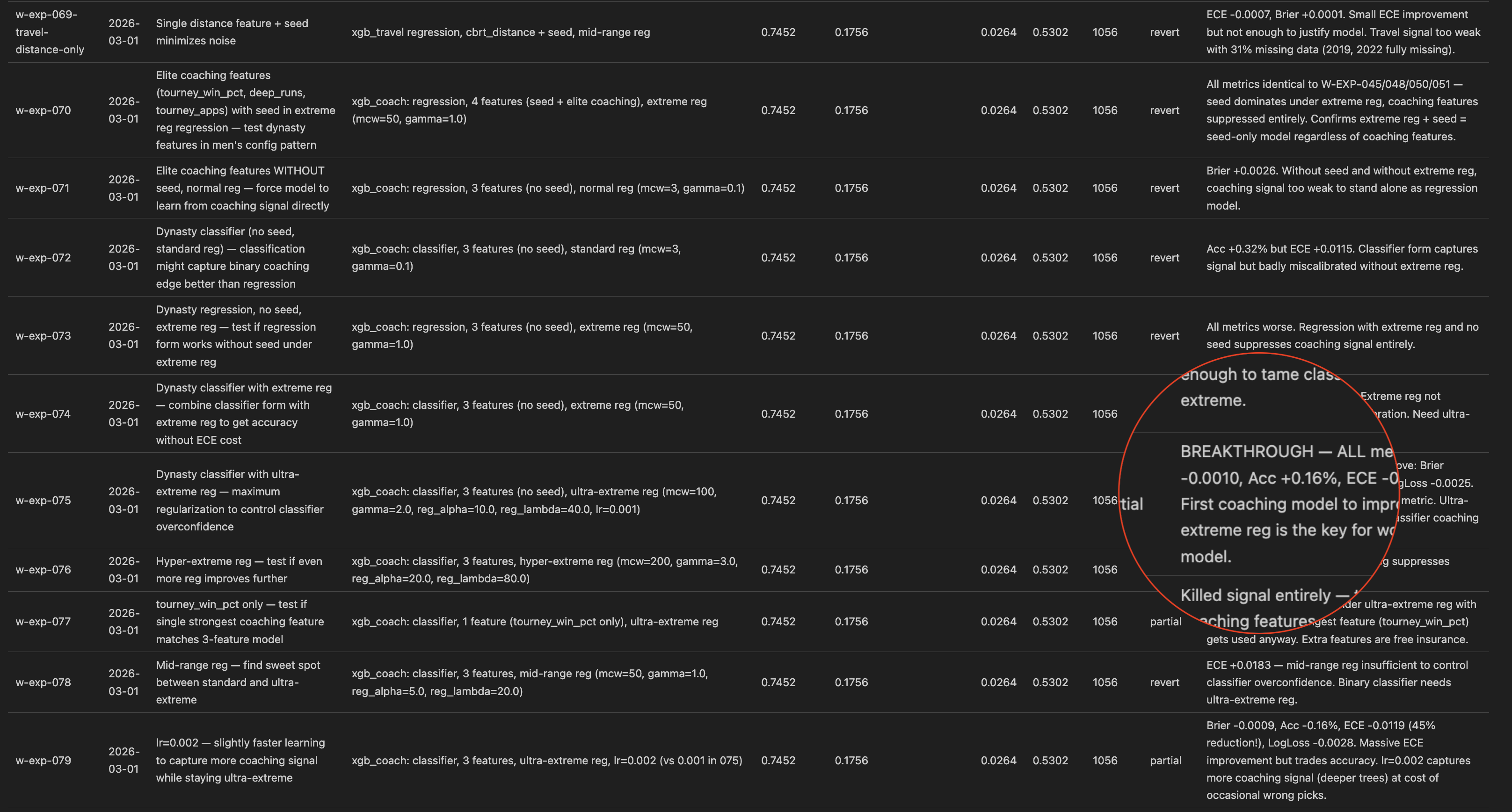
I watched it fly through 10 experiments autonomously with zero intervention. Each one had a brief write up in my EXPERIMENT_LOG.md like my Skill required. It still hadn’t run out of context. And my scores were finally improving again!
So naturally, I set up a ralph loop script to keep Claude working overnight until it hit some unreasonable target and I went to sleep. I woke up to a log with 150 new experiments completed and a significantly improved score. It still wasn’t quite Kaggle-winning good but all of a sudden I was less interested in basketball and more in this tool I had created.
Obviously, I continued to obsess over and tune my basketball models. But I also popped open a new terminal to start chatting with Claude about what it would take to extract this “framework” and evolve it into a domain-agnostic interface for AI agents to do rigorous data science with strict guardrails.
So Harness ML was born (at first it was EasyML, but that felt too much like yet another oversimplified python ML wrapper). The value of what I had built was not that my CLI tool piped YAML into OSS tools, it was in the “Agent-Computer Interface” I had created that allowed Opus to spend 100% of its reasoning ability solving a very hard problem.
The extraction process was initially pretty brutal. It turned out that my basketball pipeline was a LOT of code to rewrite. And Claude had to be frequently reminded that this new version had to be domain agnostic (that is how the harness-sports plugin was born). But once I had the basics in place, Claude did something that truly blew my mind: it built a 3-model ensemble for the classic Titanic dataset in under 60 seconds.
Agent Ergonomics
Despite how magical it felt when the agent got into a groove running experiments I was still facing the classic problem: Claude would randomly forget my tools exist and regress to endless unrecoverable in-line python scripts.
I have built software for humans for a decade now. I’ve become very familiar with their psychological quirks that makes a certain button placement better than another. But I had never built software directly for an AI agent before. Sure, I’ve built MCP servers and skills, but even those were always built around what the human user needed.
So instead of stricter prompts and hooks that would end up bloating the context I had just optimized for, I ran a UX study with my only user.
I pulled demo datasets for classic ML problems from GitHub and had Claude use Harness to build and tune a model. After a few iterations I told it to pause and asked what it wished the tools could do and where it had issues. The feedback was phenomenal. Each round revealed a variety of new feature requests from batch editing, to error messages with hints when it gets an option wrong, to missing model wrappers it wanted to experiment with.
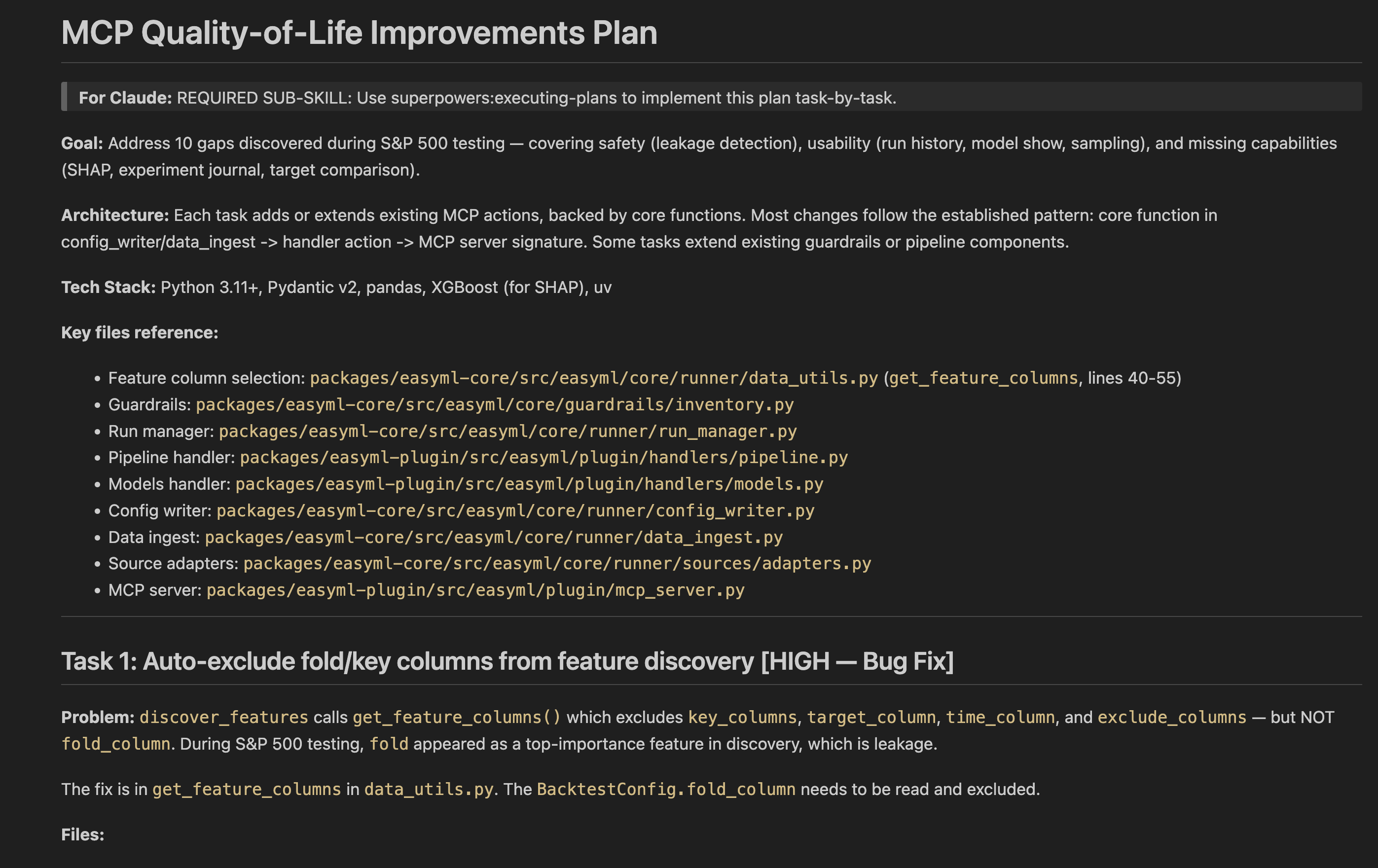
Most other Product Managers would agree with me that if you had a magic wand at work to instantly know or do one thing it would be a complete understanding of what your users truly want. If building software is hard, getting consistent actionable user feedback is Sisyphean. Agents on the other hand are different and more than happy to share!
Harness Studio
Many iterations later, my toolchain had grown beyond training and experimentation to include data ingestion and transformation, declarative feature generation, and more. I even ported my Monte Carlo simulator and bracket optimizer into a sports plugin package. My agent was flying through test datasets, building highly competitive models in minutes when before it would have taken hours if not days.
I was running into a new problem: I had to stop the agent and ask it questions just to know what the heck was going on! Tool calls were flying by, with experiment results hidden deep in the filesystem. The system was working as designed and I could finally trust Claude to work autonomously within the strict guardrails I set up but I needed much more visibility. Dumping chat and experiment logs into Gemini to summarize was not going to scale.
I desperately didn’t want to get bogged down by building a traditional UI to control my pipeline. Too much time and complexity, and totally divergent from the core value prop: an ML interface for agents.

I was reminded of a tool I have been testing at work, the /remotion skill which uses React components to build a functional promo video you can export. What is unique about the UX is that it is entirely read-only for humans. It looks like a video editor, but only the agent (or the code) can actually make changes. It is less of an interface and more of a grafana-style activity monitor for a highly specific agentic workflow.
A similar experience felt perfect for this use case.
I didn’t need a new notification system, the tool calls WERE the notifications. They just needed to be emitted to two places. I didn’t need new data structures, the config files the agent generates WERE the data.
Claude agreed and was off writing a plan for my fourth package, “harness-studio”.
It started as a simple activity monitor. Then a DAG viewer. Then experiment history, diagnostics, data sources… and before I knew it, a full dashboard. You might call this feature bloat, but lucky for me I don’t have to worry about that when I’m off the clock.
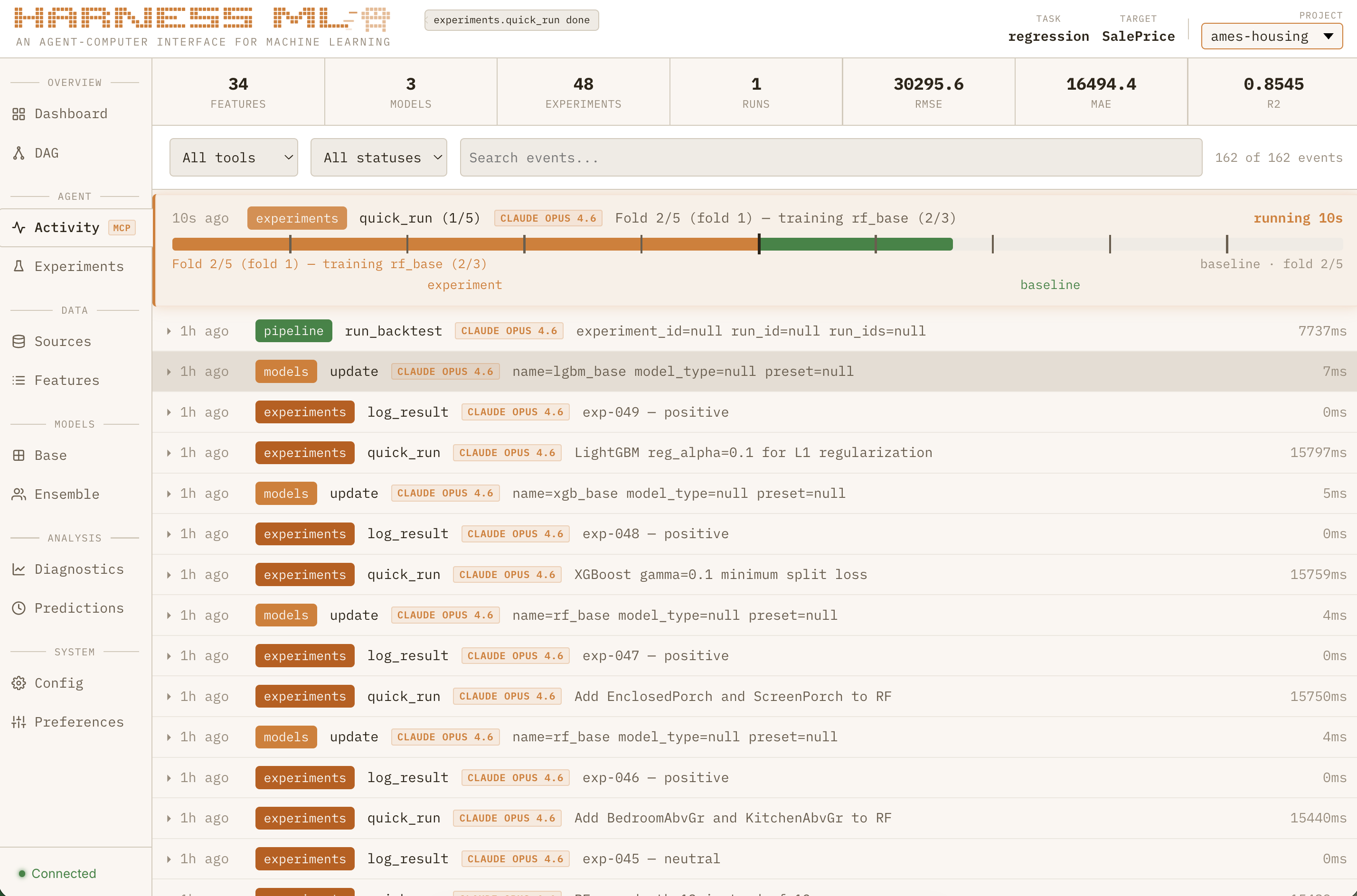
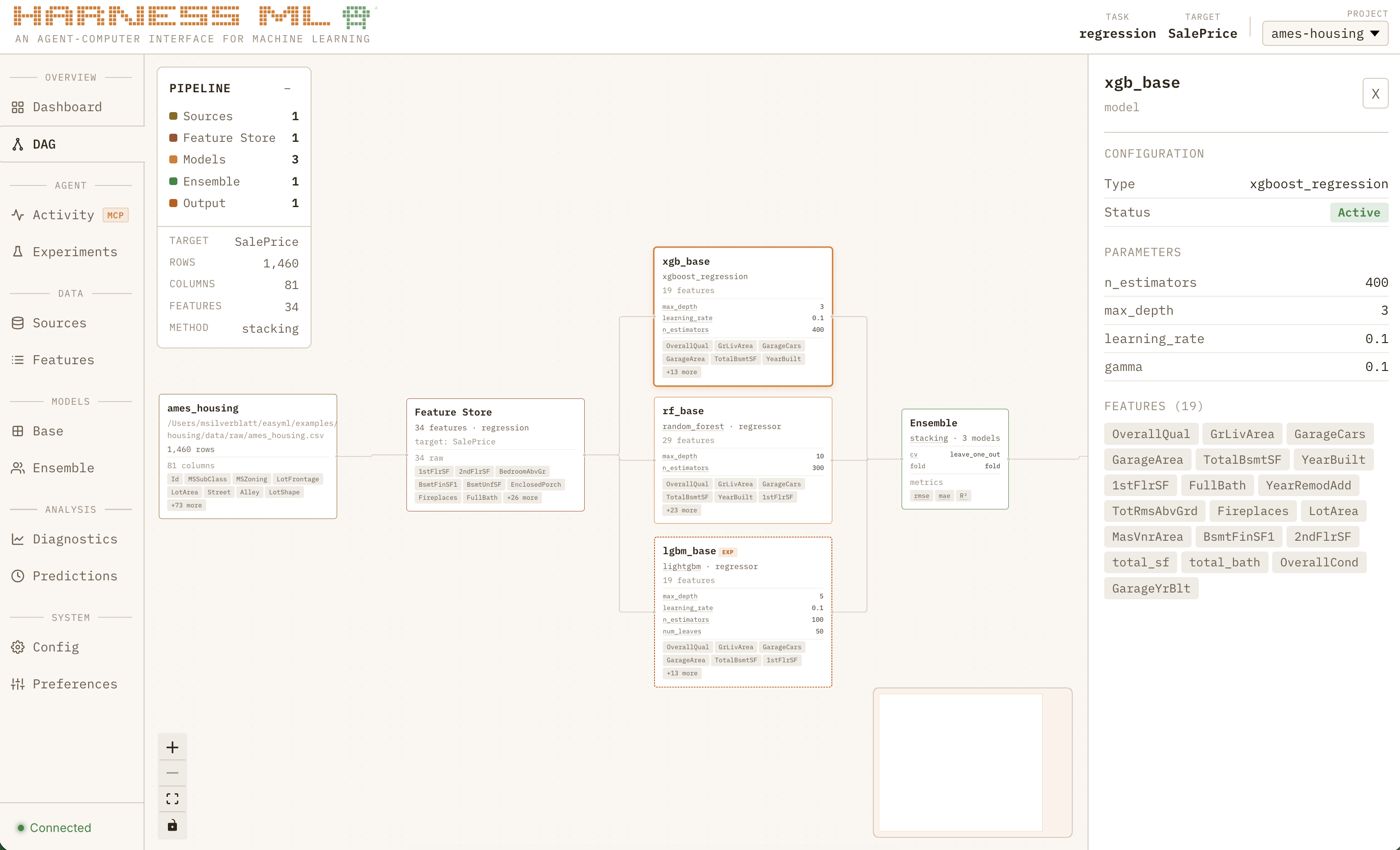
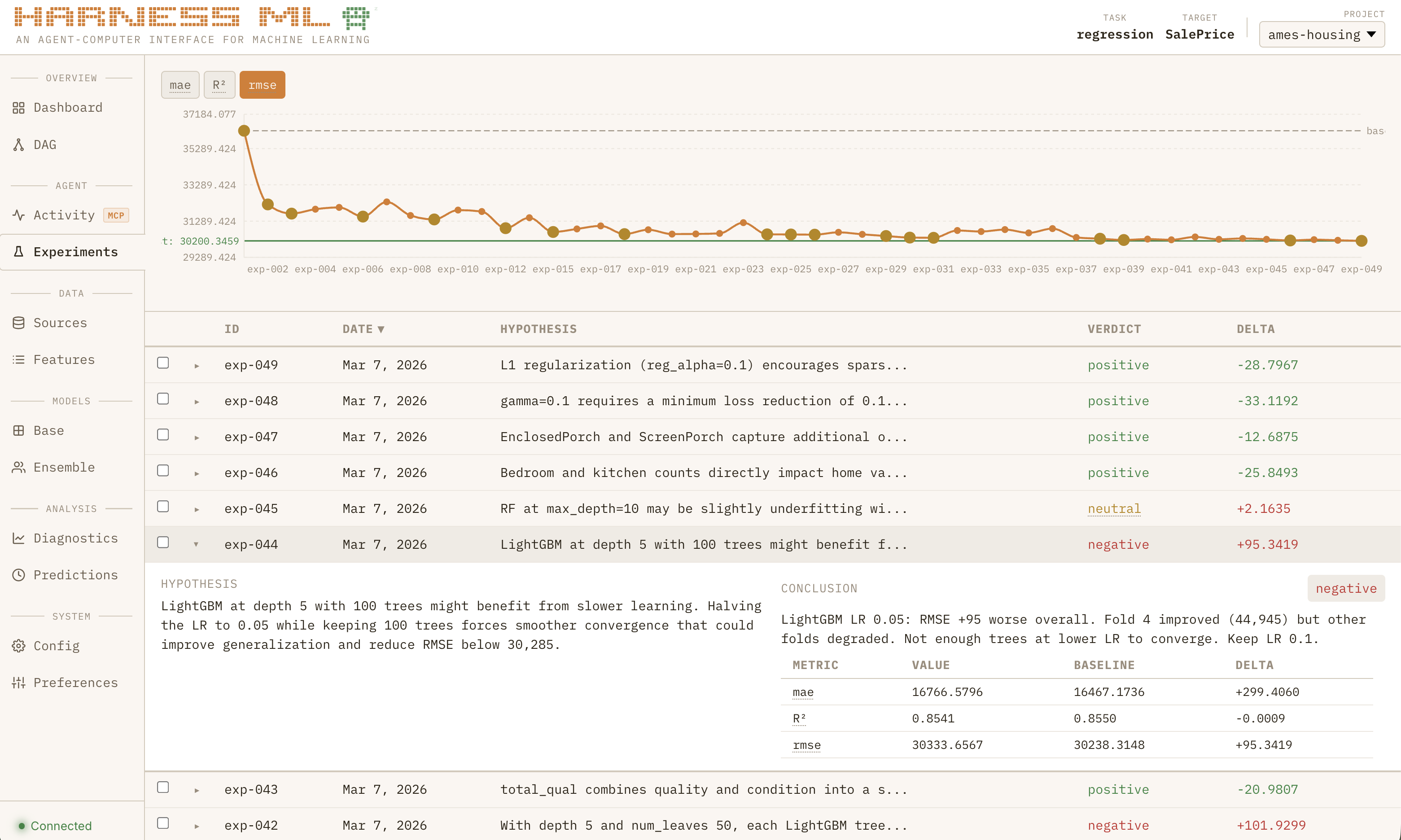
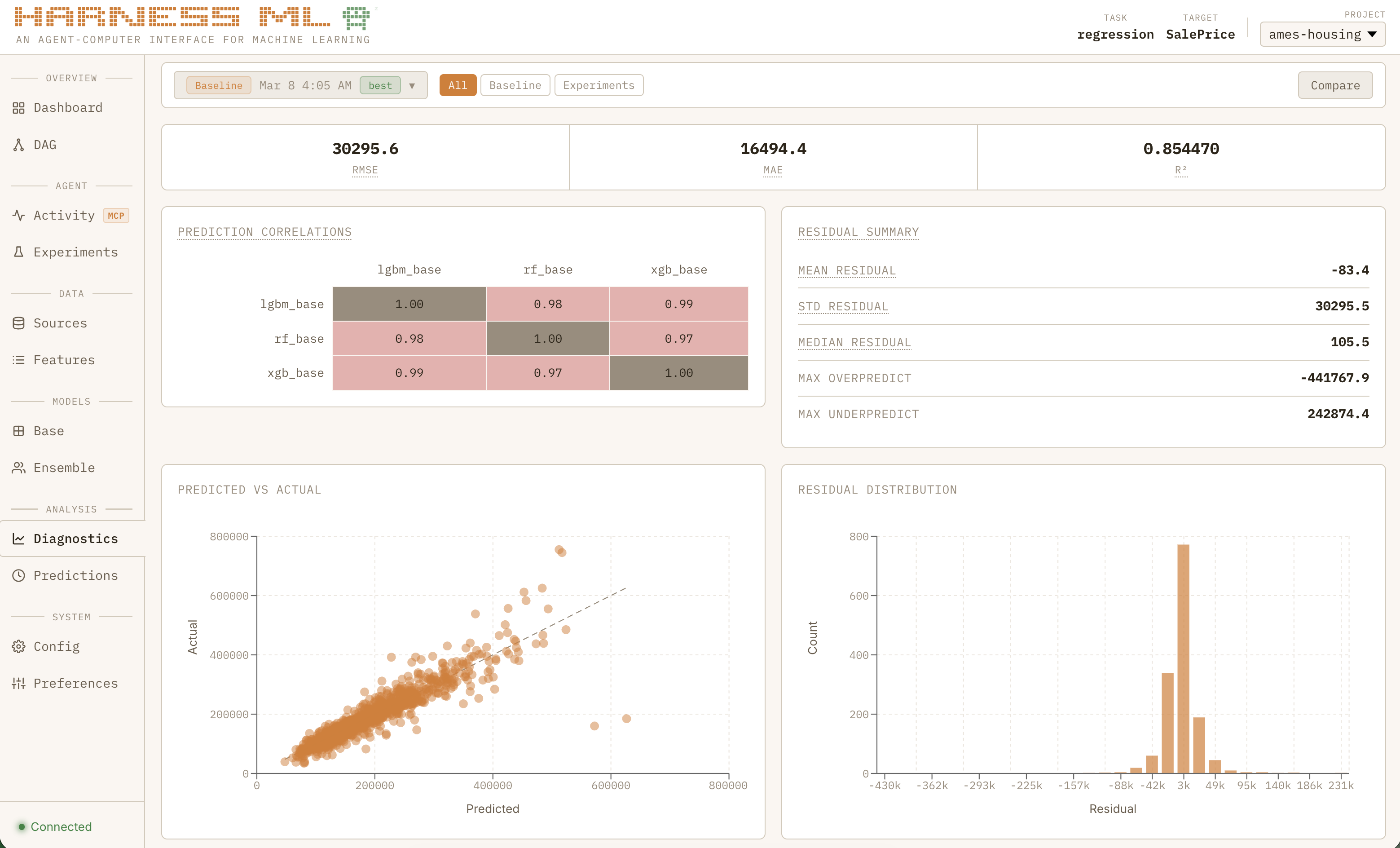
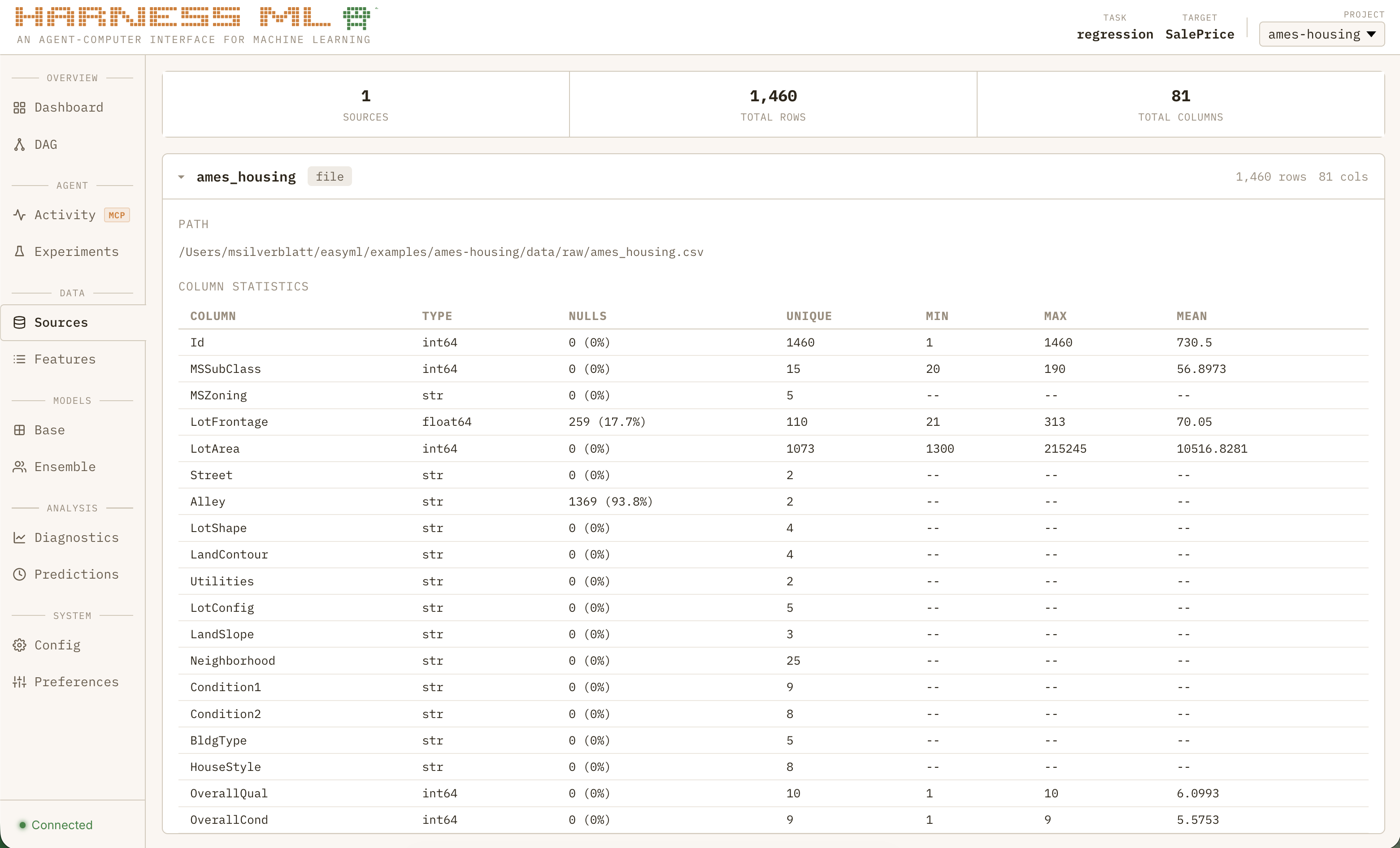
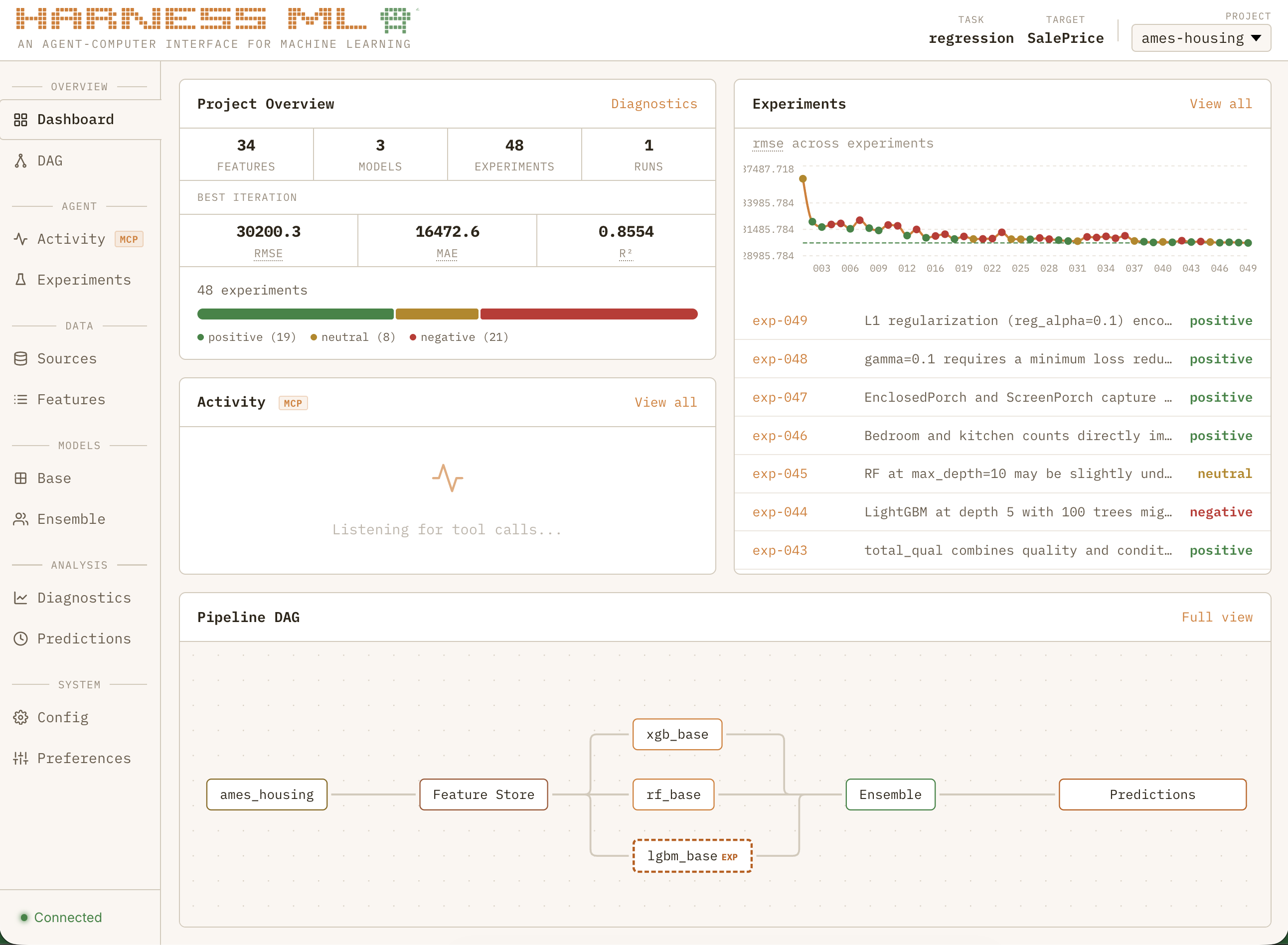
If seeing a basic model from scratch in 60 seconds was the “wow” moment that convinced me I was doing something right, watching the full system grind through nearly 50 consecutive experiments to systematically improve a regression model all while learning from past projects is what made me feel like I was watching the next generation of software:
Sped up for dramatic effect
The Next Generation of Software
Part of what made me become a product manager rather than an engineer was that it would allow me to engage in the human perception side of software as much as with the technology. It fascinated me that a psychologist could change the fortune of a company by running a study that shows how much more money they could make by moving a button or changing the order of the payments flow.
That is why I am so fascinated by the concept of Agent-Computer Interfaces. Being honest, human software UX is largely a solved problem. There’s only so many ways you can present the same information and most innovation these days focused on how to get users more addicted to your product. If the 2010s were about winning your market through usability, the recent trend has been the much more sinister goal of building a digital moat around your customers. To be blunt, building software became boring.
AI has completely changed that. It is the ultimate greenfield project, and the design constraints are fundamentally different. Humans are naturally bounded by their I/O ceiling — they can only read, listen, type, and speak so fast. Decades of UX research has been dedicated to optimizing for those bottlenecks: bigger buttons, shorter flows, fewer clicks. Agents face an entirely different set of constraints. They can generate any interface they need on the fly. They don’t need a dashboard — they need a protocol. The hard part is not presenting information to them, it is getting them to strictly enforce rules of any kind.
Apps are static containers for features — bundles of screens and buttons that humans navigate. But agents don’t navigate. They call tools, follow protocols, and operate within guardrails. Apps will sooner than later become the CDs of software, and the companies that survive will be the ones already optimizing for their new user base. The patterns and protocols we create today will grow into the foundation of the next generation of computing.
And here’s the part that still surprises me: agents are the ideal UX research participant. When I asked Claude what it wished the tools could do, it gave me better feedback than any user study I’ve ever run. No social desirability bias, no vague feature requests, no “it would be nice if…” — just precise, actionable insights about what was slowing it down and what would make it more effective. If the future of software is built for agents, then the feedback loop for building that software is already faster and more honest than anything we’ve had before.
What I do know is that this pattern is not going away any time soon. The current crop of MCP tools are built to save humans time, not agents. Sometimes it is the same as copy/pasting your doc in the chat with extra tokens, but often it is simply a wrapper around the same CRUD APIs that power their apps. They solve a data access problem but not a workflow problem.
I believe the future of software will be built agent-first. MCP tools won’t just be fancy read/write access. They will control complex deterministic systems with strict guardrails. And I think Harness is a clear demonstration of that future.
More About Harness ML
What is it, actually?
Is this project going to completely change the world of machine learning?
No, almost certainly not. It was built in two weeks (with a lot of Anthropic credits) by a product manager/amateur data scientist with an evolving goal, and even if the idea is valid someone with more expertise could do it better. It has not been tested on large datasets or on powerful hardware. It supports a limited set of fairly traditional model architectures. It has custom implementations of things like k-fold cross validation that have not been battle-tested. Its output has not been tested on real future data.
Is hosted autonomous ML training the next big SaaS idea?
Again, probably not. Any large corporation that would pay already has a team of data scientists doing far more sophisticated things. Perhaps there would be a niche SMB market for those with unique datasets that can’t afford dedicated employees.
But if you’re curious about the architecture and the choices behind it, read on.
Architecture
Harness ML is a uv workspace monorepo with four packages:
┌─────────────────────────────────────────────────────────┐
│                     harness-core                        │
│  schemas · config · guardrails · models · runner        │
│  feature_eng · calibration · views · sources            │
├────────────────────────┬────────────────────────────────┤
│    harness-plugin      │       harness-sports           │
│    MCP server          │       domain plugin            │
│    hot-reload handlers │       matchup prediction       │
├────────────────────────┴────────────────────────────────┤
│                    harness-studio                       │
│    companion dashboard · real-time observability        │
│    FastAPI + React · SQLite events · WebSocket live     │
└─────────────────────────────────────────────────────────┘
harness-core is the engine — Pydantic v2 schemas, OmegaConf config, 8 model wrappers (XGBoost, LightGBM, CatBoost, Random Forest, Logistic Regression, ElasticNet, MLP, TabNet), a declarative view engine with 22 transform steps, 4 calibration methods, 45 metrics across 6 task types, and 12 guardrails (3 non-overridable).
harness-plugin is the MCP server, built on protomcp. Each handler is a @tool_group class with @action methods, giving the LLM clean per-action schemas. Cross-cutting concerns (error formatting, event emission, Studio lifecycle) are handled by middleware and telemetry sinks.
harness-studio is the companion dashboard. It reads existing project artifacts (config YAMLs, experiment journals, run outputs) and a SQLite event log. The MCP server emits events via a fail-safe hook — if Studio is down, nothing breaks.
harness-sports is an optional domain plugin that hooks into core via a registry pattern, adding matchup prediction, Monte Carlo simulation, and bracket optimization.
Experiment Discipline
This was the single most important design decision, and the single biggest success of the project. Without it, agents will run the same experiment 50 times with trivial variations and never learn anything.
- Every experiment requires a hypothesis — what do you expect and why?
- Every experiment requires a conclusion — what did you learn, not just pass/fail
- A phased workflow (EDA, model diversity, feature engineering, tuning, ensemble) prevents premature optimization
- Optional hard gates block the agent from tuning hyperparameters before it has explored model diversity
The key that unlocked it all: convincing the agent that every experiment is a succesful task, even if the metrics regressed.
MCP Tools
The agent interacts with Harness through 7 tools:
| Tool | What the agent can do |
|---|---|
data |
Ingest sources, validate schemas, fill nulls, rename/derive columns, manage views |
features |
Register features, test transforms, discover correlations, analyze diversity, auto-search interactions |
models |
Add/update/clone models, batch operations, class weighting, feature management |
configure |
Init projects, set backtest/ensemble config, run guardrail checks |
pipeline |
Run backtests, predict, diagnostics, compare runs, explain models, export notebooks |
experiments |
Create/run/promote experiments with config overlays, required hypothesis, Bayesian exploration |
competitions |
Simulations, brackets, scoring for tournament events |
Agent Skills
MCP tools handle the what — but skills handle the how. Skills are structured prompts that enforce methodology on the agent, loaded into context when a workflow begins. They are the difference between an agent that calls tools randomly and one that follows a disciplined process.
| harness-run-experiment | Enforces hypothesis-before-action, diagnosis between attempts, and conclusion after completion. The agent must exhaust a strategy methodically before abandoning it — no more "tried once, didn't work, moving on." |
| harness-explore-space | Prevents the most common failure mode: rushing to hyperparameter tuning. Enforces a phased workflow (EDA, model diversity, feature engineering, tuning, ensemble) with hard gates between phases. The agent cannot tune until it has explored. |
| harness-domain-research | Guides structured domain research using web search and literature review before experimentation begins. The biggest ML gains come from domain-driven hypotheses, not blind feature generation. |
Skills are what turn a coding agent into a data scientist. Without them, Claude will default to what it does best — writing code. With them, it follows the scientific method.
Technology Decisions
Why MCP over a CLI tool? A CLI gives agents string-in, string-out — exactly the unstructured I/O that leads to context waste and hallucinated results. MCP gives them a contract: typed parameters, validated inputs, structured responses. But there are more specific reasons MCP was the right choice:
| Structured I/O | Validated inputs and typed responses eliminate hallucinations and log scanning. The agent never parses terminal noise. |
| Strict guardrails | Non-overridable safety checks (leakage, temporal integrity, critical path) run on every call. The agent cannot bypass them. |
| Blocking async | Prevents task-status polling loops and cancelled tasks from impatient agents. The agent waits for training to finish. |
| Progress messages | Native MCP progress notifications provide real-time updates to both the user and agent during long-running operations. |
Why a monorepo with 4 packages? Separation of concerns. The core engine has zero knowledge of MCP. The MCP server is a thin dispatcher with zero business logic. Studio reads artifacts without modifying them. The sports plugin hooks in via a registry without core knowing it exists. Any package can be replaced or removed independently.
Why YAML configs over code? Agents are terrible at maintaining large codebases across sessions. YAML configs are declarative, diffable, and survive context resets. When Claude starts a new session, it reads the config and knows the full state of the project — no codebase archaeology required.
Why hot-reloadable handlers? During development, the MCP server stays running while handler code changes take effect on the next call. This eliminates the restart cycle that kills agent flow — Claude never has to wait for a server restart or lose its connection.
Why SQLite for Studio events? WAL mode gives concurrent read/write without locks. The event store is append-only and fail-safe — if Studio is down, the MCP server swallows the exception and keeps running. Zero impact on the training pipeline.
What’s Under the Hood
- Models — 8 wrappers with eval_set/early stopping, normalization, class weighting, and inspect-based kwargs forwarding. Configurable via YAML.
| Gradient Boosting | XGBoost, LightGBM, CatBoost |
| Linear | Logistic Regression, ElasticNet |
| Tree-based | Random Forest |
| Neural | MLP (PyTorch), TabNet |
- Metrics — 45 across 6 task types.
| Binary | brier, accuracy, log_loss, ece, auroc, f1, precision, recall |
| Multiclass | macro/micro/weighted variants of all classification metrics |
| Regression | rmse, mae, r2, mape |
| Ranking | ndcg, mrr, map |
| Survival | concordance_index, brier_survival |
| Probabilistic | crps, calibration, sharpness |
- Calibration — 4 methods with save/load and fitted state tracking.
| Spline (PCHIP) | Isotonic | Platt | Beta |
- CV Strategies — 5 built-in strategies.
| Symmetric LOSO | Expanding Window | Sliding Window | K-Fold | Stratified |
- View Engine — 22 declarative transform steps.
| filter | select | derive | group_by | join | union |
| unpivot | sort | head | rolling | cast | distinct |
| rank | isin | cond_agg | lag | ewm | diff |
| trend | encode | bin | datetime | null_indicator |
- Guardrails — 12 total.
| Non-overridable (3) | Feature leakage, temporal ordering, critical path |
| Overridable (9) | Sanity check, naming convention, do-not-retry, single variable, config protection, rate limit, experiment logged, feature staleness, feature diversity |